This pick is based on live Amazon listing data and a close read of verified-purchase reviews — not hands-on testing of this exact unit.
Why We Picked the Insta360 Link 2
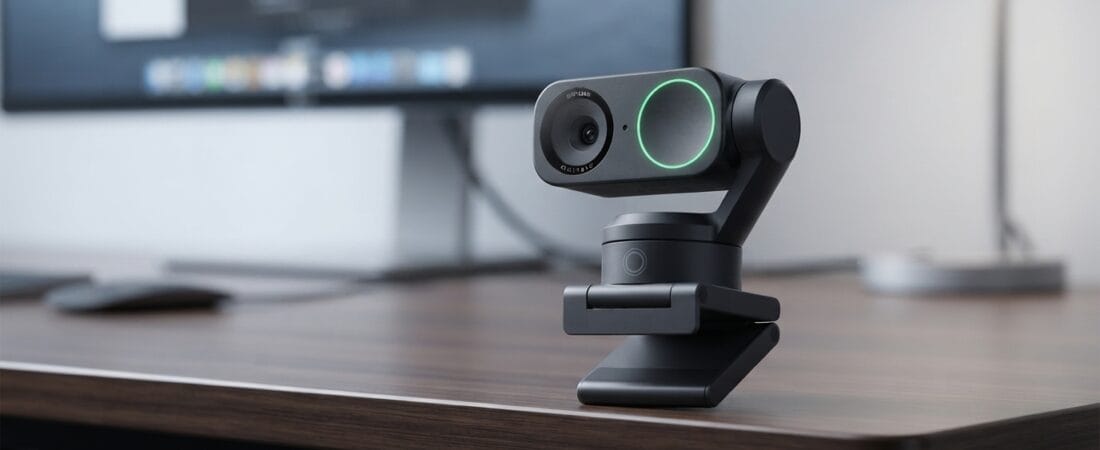
The Insta360 Link 2 is a PTZ (pan-tilt-zoom) 4K webcam built around a 1/2″ sensor — noticeably larger than what most webcams in this price range use — paired with AI subject tracking that physically moves the camera to keep you framed as you move around a room. At $195.99 it’s an Amazon’s Choice pick with 1,495 ratings averaging 4.6 stars and over 1,000 bought in the past month. Beyond video calls, it supports DeskView and Whiteboard modes, gesture control, and a Link Controller app for backgrounds and framing presets — aimed at streamers, remote workers, and anyone tired of a flat, static laptop camera.
What Owners Actually Say
The most repeated praise across verified reviews is image quality relative to price and how well the AI tracking actually works. One reviewer called it “the ultimate web cam,” specifically noting crisp 4K video and a genuinely useful three-speed tracking system that compensates for small movements while staying seated. A macOS user detailed a smooth setup on a Mac Mini M4 (with one extra step — enabling “Camera Extensions” in system settings for virtual backgrounds), and said 24/7 tech support walked them through it at 1 a.m. Multiple reviewers specifically called out the natural bokeh effect and low-light performance as standing out from cheaper webcams they’d used before.
One Thing to Check
Two specific, genuine caveats show up in verified reviews rather than generic complaints. First, a 4-star reviewer found that the Link Controller software doesn’t let you capture still photos directly — the workaround is reassigning the camera inside your OS’s native camera app (Windows Camera or similar). Second, and worth knowing before you buy: a detailed 5-star review specifically confirms the Link 2 is not compatible with Windows Hello facial recognition — the reviewer bought it assuming it would work for face login, and it doesn’t. If Windows Hello support is your reason for buying a webcam, this isn’t the one.
Pros
- 1/2″ sensor with true 4K video, HDR, and natural bokeh — reviewers consistently note the jump in quality over cheaper webcams
- AI tracking with three adjustable speeds, genuinely useful for walking around a room or presenting
- Confirmed working smoothly with Zoom, Teams, and OBS on both Mac and Windows
- Gesture control and DeskView/Whiteboard modes add real flexibility beyond a static webcam
- 4.6 stars across 1,495 ratings, Amazon’s Choice
Cons
- Not compatible with Windows Hello facial recognition login, confirmed by a verified reviewer who tested it specifically for that use case
- The Link Controller software doesn’t support taking still photos directly — requires a workaround via your OS’s native camera app
- Mac setup requires a one-time manual step (enabling Camera Extensions) for virtual backgrounds to work
FAQ
Does it work with Zoom, Teams, and OBS?
Yes — reviewers confirm smooth operation across all three on both Mac and Windows, with no compatibility issues reported for basic video calling.
Do I need special software to use it?
The Link Controller app unlocks AI tracking, gesture control, virtual backgrounds, and framing presets. The camera works as a basic webcam without it, but you’ll want the app for the features that make this camera worth the price.
Is 4K necessary, or does it help to drop to 1080p?
At least one reviewer noted that 4K can introduce visible background noise in some lighting, and found 1080p at 24-25fps to be the practical sweet spot for everyday calls — worth testing both if you’re picky about noise.
For Specific Needs
Do I need a webcam that logs me in with Windows Hello facial recognition? Not this one. A verified reviewer specifically bought the Link 2 for Windows Hello face-login and confirmed it does not support that feature — if that’s your primary use case, look for a webcam that explicitly advertises Windows Hello compatibility instead.
Will this work for streaming and content creation, not just video calls? Yes — reviewers specifically use it for TikTok streaming and content creation, praising how reliably the AI tracking follows movement around a room, in addition to its use for professional video calls.
Does it need extra setup steps on a Mac? One small one: macOS users need to manually enable “Camera Extensions” in System Settings the first time, in order to use virtual backgrounds — after that one-time step, reviewers report it works seamlessly.
Methodology
This pick is based on live Amazon listing data (price, rating, review volume verified on the product detail page) and a reading of multiple verified-purchase reviews spanning both critical and five-star feedback. The exact unit was not physically tested by our team; claims above are drawn directly from what real buyers reported.
Check the current price on Amazon
As an Amazon Associate, we earn from qualifying purchases.
How We Built This Guide
Our process: this is a research-based pick, not a hands-on lab test. We aggregate verified-owner reviews, professional test data where available, and real discussion patterns from communities like Reddit, then flag every estimate as such in the guide above. We do not accept sponsored placements.
Last checked: September 12, 2026
More Buying Guides in This Category
- Best Noise-Cancelling Headphones for Travel 2026 — Our Research Pick: Anker Soundcore Space Q45
- Best Budget Mini PC 2026: Our Research Pick — GMKtec Nucbox G3 Pro
- Best Mobile Gaming Controller 2026: Our Research Pick — GameSir G8 Galileo
- Best Phone Gimbal Stabilizer 2026: Our Research Pick — DJI Osmo Mobile 6