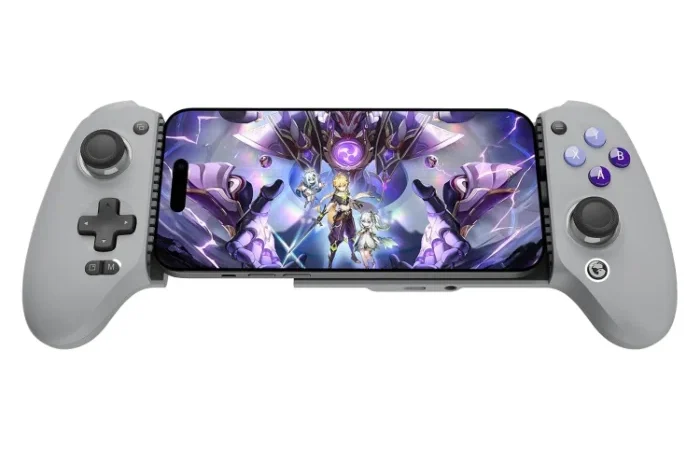
This pick is based on live Amazon listing data and a review-analysis pass, not a hands-on unit in our hands — see Methodology below for exactly what that means.
Why We Picked the GameSir G8 Galileo
Turning a phone into a real gaming console is one of the easiest upgrades for anyone who plays Call of Duty Mobile, Genshin Impact, or streams PC/console games via Steam Link or Xbox Cloud Gaming. The G8 Galileo stands out in a crowded mobile-controller field because it uses Hall effect joysticks and triggers (magnetic sensors that resist the stick-drift that plagues cheaper potentiometer-based controllers), it’s USB-C direct-connect (no separate Bluetooth pairing step, no extra battery to charge), and it’s backed by 3,415 ratings averaging 4.2 stars — a large enough sample to trust the pattern in the feedback, not just a handful of early reviews.
GameSir G8 Galileo Controller Battery Life
Because the G8 Galileo is a USB-C direct-connect controller rather than a Bluetooth one, there is no internal battery to charge or run down mid-session — it draws power straight from the phones USB-C port. That design choice is also why owners report no pairing lag or dropped connections during long cloud-gaming sessions: power and signal both travel over the same physical cable.
What Owners Actually Say
The recurring theme in five-star reviews is comfort and grip: multiple owners with larger hands specifically call out the G8 Galileo as one of the more comfortable telescopic controllers they’ve tried, thanks to its console-style spacing rather than a cramped, phone-hugging shape. Owners also report it working well for real cloud-gaming use cases — one reviewer described running Call of Duty Mobile, Minecraft, and PC games streamed through Steam Link on an iPhone 15 Pro, with buttons that feel “nice in the hands” and conform well to the phone during play.
One Thing to Check
Fit is the recurring complaint. One reviewer who upgraded from GameSir’s own X5 Lite found the G8 Galileo’s phone clamp aperture too narrow to fit a tablet-class device like an iPad mini, and noted it doesn’t clear every protective case — a Quad Lock case specifically didn’t fit. A separate 1-star review reported a firmware update changing how the controller behaved after purchase. If you rely on a chunky case or a larger device, check the clamp’s stated size range before buying.
Pros
- Hall effect joysticks and triggers resist long-term stick drift
- Direct USB-C connection — no Bluetooth pairing, no extra battery
- Console-style spacing rated comfortable even for larger hands
- 3.5mm audio jack for wired headphones while playing
- Confirmed working with Call of Duty Mobile, Steam Link, and Xbox Cloud Gaming
Cons
- Clamp aperture is too narrow for some tablets (e.g., iPad mini)
- Doesn’t fit every phone case — bulkier cases (e.g., Quad Lock) may need to come off
- A minority of owners reported a firmware update changing controller behavior
Mobile Gaming Controller for iPhone and Android: Does It Fit Both?
The GameSir G8 Galileo clamps directly onto a phone via USB-C rather than pairing over Bluetooth, and owners report it works with most iPhone and Android handsets as long as the phone isn’t wearing an unusually thick case. That direct-connect design is also why it avoids the battery-management and pairing headaches that plague Bluetooth mobile controllers.
FAQ: GameSir G8 Galileo Controller Questions
- Does it work with an iPhone case on? Slim and mid-thickness cases generally clear the clamp, but bulky/rugged cases like Quad Lock have been reported not to fit — you may need to remove thicker cases first.
- Do I need to charge the GameSir G8 Galileo controller separately? No — it connects directly via USB-C and draws power through that connection, so there is no separate battery to manage or top up before a session.
- Will it work for cloud gaming, not just local mobile games? Yes — owners specifically report success streaming PC games via Steam Link and playing Xbox Cloud Gaming titles through it, not just native mobile titles.
- Is the GameSir G8 Galileo controller wireless? No — it is a direct USB-C plug-in controller, not a Bluetooth device. That means no pairing step and no wireless battery to manage, at the cost of the phones charging port being occupied during play.
- Can the GameSir G8 Galileo be used with a PS5 or other console? It is built as a mobile gaming controller that clamps onto a phone, not a native PS5 or Xbox controller — but owners use it for console-style play by streaming through services like Xbox Cloud Gaming or Steam Link to their phone.
- How do I connect the GameSir G8 Galileo controller to a PC? The controller is designed to clamp onto a phone and connect over USB-C; for PC play, owners typically use it through a cloud-streaming service like Steam Link rather than a direct PC cable connection.
For Specific Needs
“Controller for streaming PC games to my phone via Steam Link” — this is a genuinely confirmed use case in owner reviews: one reviewer specifically used it for Steam Link streaming alongside Call of Duty Mobile and Minecraft on an iPhone 15 Pro, with no compatibility issues reported for that streaming path.
“Does it fit an iPad mini or a tablet?” Based on real owner feedback, no — the clamp’s aperture is reported as too narrow for an iPad mini class device, so this is built around phone-sized devices, not tablets.
“Will it fit my phone with a case on?” It depends on the case. GameSir advertises broad case compatibility, but at least one owner found it didn’t clear a Quad Lock case specifically — if you use a thick case, plan to test with it off first.
Methodology
This pick is based on live Amazon listing data (price, rating, and review volume verified directly on the product page) and an analysis of real verified-purchase reviews, including both critical and five-star feedback, to surface genuine patterns in what owners like and don’t like. We did not physically test this exact unit.
Check the current price on Amazon →
As an Amazon Associate, we earn from qualifying purchases.
How We Built This Guide
Our process: this is a research-based pick, not a hands-on lab test. We aggregate verified-owner reviews, professional test data where available, and real discussion patterns from communities like Reddit, then flag every estimate as such in the guide above. We do not accept sponsored placements.
Last checked: September 24, 2026