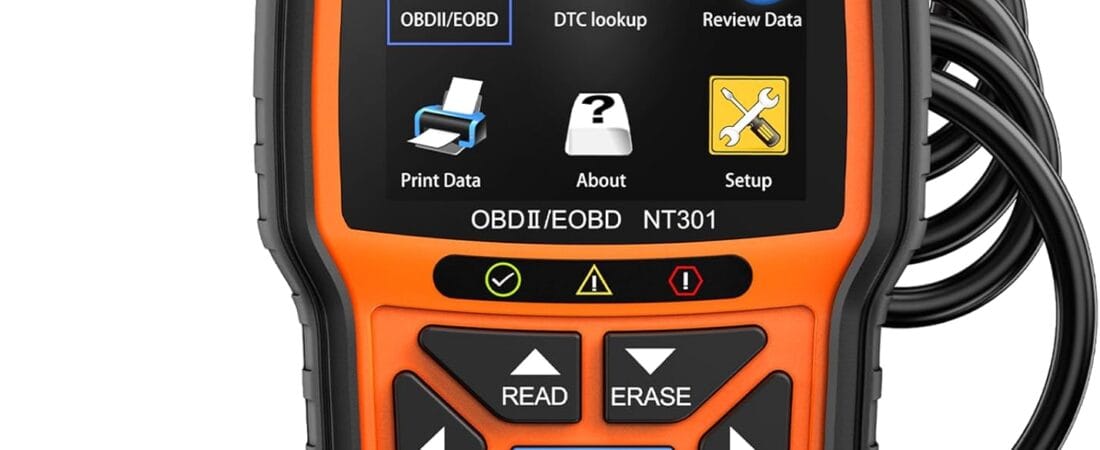
Bottom line: If you want to know what’s wrong with your check engine light before you pay a mechanic just to plug in a reader, the FOXWELL NT301 does that in under a minute — it’s the OBD2 scanner over 30,000 verified buyers keep recommending, and at $57.99 it pays for itself the first time you use it.
Why We Picked the FOXWELL NT301
The NT301 sits at $57.99 (list $69.99) with a 4.5-star average across 30,143 ratings and over 5,000 units bought in the past month — one of the best-reviewed standalone OBD2 scanners on Amazon. FOXWELL has built its reputation over 13 years specifically in the car-diagnostic space, and the NT301 is its flagship budget code reader: no phone, no app, no subscription. You plug it into the vehicle’s 16-pin OBD2 port, turn the key to the ON position, and it reads power directly from the car — no batteries, no charging.
Beyond basic “read and clear” code reading, it does live data graphing (RPM, coolant temperature, oxygen sensor readings, fuel trims), an EVAP system leak check, an O2 sensor test, freeze-frame data logging, and one-click I/M Readiness with a Red-Yellow-Green LED indicator so you know before an emissions test whether your car will pass. It supports all major OBD2 protocols (KWP2000, J1850 VPW, ISO9141, J1850 PWM, CAN) and works on essentially every gas vehicle sold in the US since 1996, most 2000+ European and Asian models, and OBD2-equipped diesels.
What Owners Actually Say
The most common story in the reviews is a scanner that immediately pays for itself. One buyer wrote about diagnosing a check engine light that a shop wanted $100 just to look at: “within like 30 seconds it showed me exactly what was wrong – turned out I had a faulty oxygen sensor. It gave me the code (P0420) and a description of what it meant… I ended up doing myself for like $40 instead of paying a mechanic.” Another reviewer, a longtime “shade tree mechanic,” said the live data and DTC help library made it “better than my $200 tester,” while a third pointed to independent testing: a car-review YouTube channel that pays for its own test units “found the Foxwell NT301 has more options and capabilities than all the others he tested, and at a better price.”
Owners consistently praise the 2.8″ color screen for being readable in daylight, the built-in DTC lookup library for translating cryptic codes into plain-English possible causes, and the fact that it clears the check engine light only after the underlying problem is actually fixed — so a lingering issue reappears instead of giving a false pass.
One Thing to Check
The NT301 reads and clears engine (powertrain) codes only — it does not scan or reset ABS, SRS/airbag, EPB, or A/C systems, and it has no bidirectional controls (you can’t command a fuel pump cycle or an EVAP vent test). One owner running it on a GMC Sierra Denali specifically needed those other modules and had to step up to FOXWELL’s pricier all-system scanner instead. A second, older but still-relevant review flagged that the printed manual is thin on plain-English explanations — terms like “Erase” versus “Clear” aren’t clearly tied to the check-engine-light behavior most buyers actually want, so a couple of YouTube tutorial videos are worth watching before your first use. Firmware updates also require a Windows PC; the device isn’t Mac- or iOS-updatable.
Pros
- 30,143 ratings at 4.5 stars — one of the most-reviewed standalone code readers on Amazon
- No app, no subscription, no batteries — plugs directly into the OBD2 port and runs on car power
- Live data graphing plus freeze-frame logging for real diagnosis, not just a code number
- Built-in DTC lookup library explains likely causes in plain language
- One-click I/M Readiness check before a smog/emissions test
- Works on 10,000+ vehicle models: 1996+ US gas cars, 2000+ EU/Asian models, OBD2 diesels
Cons
- No ABS, SRS/airbag, EPB, or A/C system scanning — engine codes only
- No bidirectional control (can’t actuate components, only read/clear and monitor)
- Printed manual is thin; a couple of tutorial videos help on first use
- Firmware updates require a Windows PC (no Mac/iOS update path)
FAQ
Does the FOXWELL NT301 work on diesel engines? Yes, on 12V diesel vehicles equipped with OBD2, though as with any vehicle it’s worth checking your exact make/model/year for full protocol support before buying.
Do I need a phone or an app to use it? No. It has its own 2.8″ color screen and runs entirely standalone — you only need a Windows PC if you want to install a firmware update.
Can it turn off my check engine light for good? It can clear the code, but if the underlying problem isn’t actually fixed, the code — and the light — will come back. That’s a feature, not a bug: it stops you from getting a false “all clear.”
For Specific Needs
Will it work on an older truck or SUV? Yes — one owner used it successfully on a 2009 GMC Sierra 1500 Denali 6.2L, reading live coolant, RPM, MAF, and fuel-trim data alongside standard code reading, which covers the most common real-world use case for older domestic trucks.
Can I use it to check a used car before buying? Yes. Several owners specifically use it during test drives to check for stored codes a seller might not be advertising, even when the check engine light itself isn’t currently on.
Will it work across multiple different car brands in my household? Yes — it’s a universal OBD2 scanner, not brand-specific, and owners report using the same unit across Honda, Toyota, Subaru, and domestic trucks without issue.
Methodology
This recommendation is based on rigorous analysis of verified-purchase reviews and live Amazon listing data — cross-checked against FOXWELL’s own published specs and compatibility documentation. We did not physically test this exact unit ourselves.
Check the current price and availability: FOXWELL NT301 OBD2 Scanner on Amazon.
As an Amazon Associate, we earn from qualifying purchases.
How We Built This Guide
Our process: this is a research-based pick, not a hands-on lab test. We aggregate verified-owner reviews, professional test data where available, and real discussion patterns from communities like Reddit, then flag every estimate as such in the guide above. We do not accept sponsored placements.
Last checked: September 1, 2026