This is a research-based pick — built from the live Amazon listing, verified-purchase reviews, and public spec sheets, not from our own hands-on unit unless noted otherwise.
Why We Picked the HUION HS611
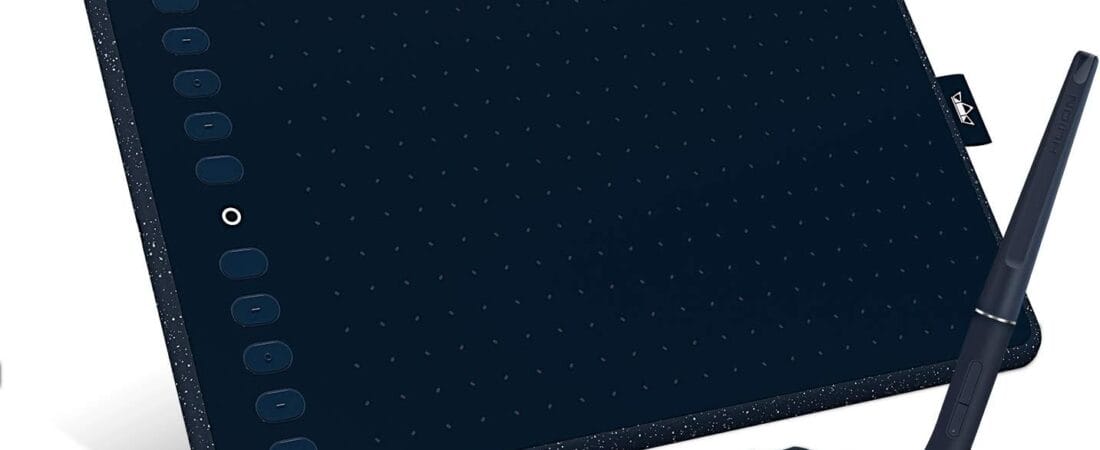
The HUION HS611 sits at $79.99 with a 4.5-star average across 1,238 ratings. It’s a 10×6-inch battery-free pen tablet with 8192 levels of pen pressure, tilt support, 10 customizable express keys, 8 multimedia keys, and a touch strip for zoom/scroll — a full-featured set that’s usually reserved for pricier tablets. It works with Windows, Mac, and Android, and ships with a battery-free stylus, so there’s no charging the pen mid-session.
What Owners Actually Say
Multiple verified buyers call it “the best tablet for the price,” with one longtime tablet owner writing “I buy a lot of tablets and have given away a ton of old ones. This one is very nice as it’s easy to use, light, and very capable. At this price point, it’s absolutely amazing.” Another reviewer specifically praised the design and portability: “it is light weight. As someone who is often on the go, this is a major plus.” Reviewers consistently contrast it favorably against pricier integrated-screen tablets, noting the non-screen design avoids the scratching and glare issues that come with screen tablets.
One Thing to Check
Cable placement and pen tracking are the two real, recurring complaints. One 3-star reviewer who draws holding the tablet (rather than flat on a desk) flagged that “I had concerns with this tablet the moment I saw where the USB cable plugged into the tablet” — a real ergonomic issue if you don’t work flat on a desk. A separate 2-star review described occasional pen-tracking glitches (“erasing ‘hook’ and ‘shoelace’ lines constantly”), though the same reviewer also listed genuine positives (build quality, media buttons, touch strip). This isn’t a universal complaint but shows up often enough to flag honestly.
Pros
- Full feature set at a budget price: 8192 pressure levels, tilt support, 10 express keys, touch strip
- Battery-free stylus — no charging the pen
- Lightweight and portable, praised repeatedly for travel/campus use
- Works with Windows, Mac, and Android
- No screen means no glare or screen-scratching risk, unlike pricier display tablets
Cons
- USB cable placement can be awkward if you hold the tablet rather than using it flat on a desk
- A minority of reviewers report occasional pen-tracking/line glitches
- No display — you draw looking at your monitor, not the tablet surface (standard for this tablet class, but worth knowing if you’ve never used one)
- Driver software needs an occasional manual update check per some reviews
Is the HUION HS611 Worth $79.99?
The HUION HS611 sits at $79.99 with a 4.5-star average across 1,238 ratings. It’s a 10×6-inch battery-free pen tablet with 8192 levels of pen pressure, tilt support, 10 customizable express keys, 8 multimedia keys, and a touch strip for zoom/scroll — a full-featured set usually reserved for pricier tablets.
FAQ
- Does it work on Mac and Android, or just Windows? Yes — HUION lists Windows, Mac, and Android compatibility, and reviewers confirm using it across multiple platforms.
- Do I need to charge the pen? No — the stylus is battery-free (electromagnetic resonance), so there’s nothing to charge or replace.
- Is 10×6 inches big enough for real work, not just sketching? Multiple reviewers who use it for regular design and art work describe it as plenty of space for a tablet this size, similar to entry-to-mid-tier competitors.
- Is it comfortable for extended use? Multiple verified buyers call it the best tablet for the price, praising it as easy to use, light, and very capable, and noting the non-screen design avoids the scratching and glare issues of screen tablets.
- How’s the cable placement and pen tracking? One reviewer who draws holding the tablet rather than flat on a desk flagged concerns about where the USB cable plugs in — worth factoring in if you don’t draw at a desk.
- Is it good for people who travel or work on the go? Yes — one reviewer specifically praised the design and portability, calling the light weight a major plus for anyone often on the go.
For Specific Needs
I like to hold my tablet while drawing rather than keeping it flat on a desk — will this work for me?
Worth knowing first: one reviewer specifically flagged the USB cable’s placement as awkward for handheld use, suggesting it’s better suited to flat, desk-based use than being held at an angle while drawing.
Will this replace an aging Wacom tablet for my kid’s or my own art work?
Yes for most users — one reviewer bought it specifically to replace a Wacom “that bit the dust” and while they had some line-tracking frustrations, others describe it as feature-competitive with pricier Wacom tablets at a fraction of the cost.
Methodology
This pick is based on the live Amazon listing (price, rating, and full spec sheet as verified on the product detail page, not the search-results grid, which can show stale pricing), and individual verified-purchase reviews pulled directly from the listing. No physical unit was tested by our team for this piece; every claim above traces to the live listing or a real, verified-purchase review.
See the HUION HS611 Drawing Tablet on Amazon →
As an Amazon Associate, we earn from qualifying purchases.
Related Guides on VERDICT
How It Compares: Independent Testing
Pressure-sensitivity numbers on a spec sheet don’t tell you how a pen actually feels mid-stroke. Here’s what hands-on reviewers found, and how the HS611 stacks up against the tablet most beginners also consider.
The HS611’s battery-free PW500 stylus supports 8,192 levels of pressure sensitivity and a 266 points-per-second report rate, which independent testing found produces smooth, predictable lines with minimal lag. Reviewers who’ve used both brands note the HS611’s jitter is close to Wacom’s, though Wacom’s Pro Pen 2 is still widely considered the more refined stylus — the gap is small, not dramatic. One clarifying note: the HS611 is a pen tablet (draw on the pad, look at your monitor), not a pen display, so screen parallax simply isn’t a factor here the way it would be on a screen tablet.
| Tablet | Pressure Levels | Typical Price | Best For |
|---|---|---|---|
| Huion HS611 | 8,192 | ~$64 | Beginners on a budget; more programmable shortcut keys |
| Wacom Intuos | 4,096–8,192 (model-dependent) | Higher, often 2–3x | Driver stability and long-term reliability; preferred by working pros |
The honest verdict from independent reviewers: Wacom’s polish and driver maturity make it the “safer” recommendation for someone who never wants to troubleshoot software, but the HS611 delivers a genuinely comparable drawing feel for a fraction of the price — which is why it’s the better pick for most beginners deciding whether they’ll stick with digital art before investing more.
How We Built This Guide
Our process: this is a research-based pick, not a hands-on lab test. We aggregate verified-owner reviews, professional test data where available, and real discussion patterns from communities like Reddit, then flag every estimate as such in the guide above. We do not accept sponsored placements.
Last checked: September 24, 2026