This pick is based on live Amazon listing data and analysis of verified-purchase reviews — we have not physically tested this exact unit ourselves unless otherwise noted.
Why We Picked the OBSBOT Meet SE
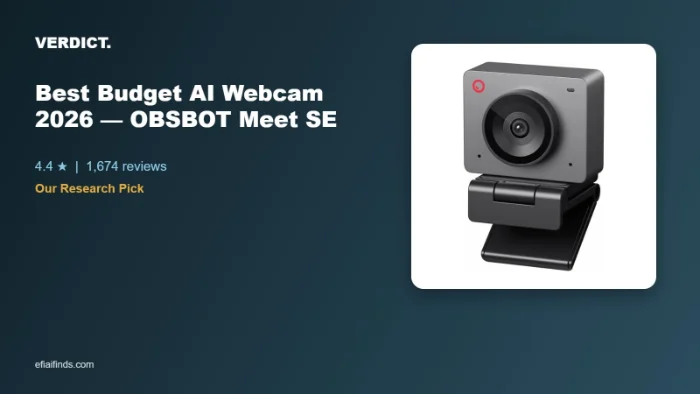
The OBSBOT Meet SE (Space Grey) currently runs $58.00 with a 4.4-star average across 1,674 ratings and carries an Amazon’s Choice badge. It’s the budget entry point into OBSBOT’s AI-camera lineup, offering 1080p at up to 100FPS, gesture-based zoom/framing controls, and a magnetic privacy cover that physically disconnects the camera from the computer’s recognition when closed. For the price, it undercuts most AI-tracking webcams by $50-100 while keeping the core AI framing and beauty-mode features that made OBSBOT’s higher-end Meet 2 popular.
What Owners Actually Say
Reviewers consistently rate image quality well above the price point — several who switched from base Logitech or NexiGo webcams describe noticeably better clarity and low-light handling. The magnetic lens cover is repeatedly praised as both a genuine privacy feature and a convenient way to disable the camera mid-stream without unplugging anything. The hands-free gesture zoom (an open palm to toggle AI framing, a pinch to zoom) works reliably for many owners once they’ve adjusted their lighting — several note it needs decent front-facing light to register consistently.
One Thing to Check
Two issues come up repeatedly in critical reviews. First, the built-in microphone is a genuine weak point — multiple owners who were otherwise happy with the video quality specifically called out thin, quiet, or “tin can”-sounding audio, with one professional voice-over user ending up buying a separate USB microphone. Second, the AI auto-framing has a documented habit of resetting to a fully zoomed-in view on its own, even with custom framing saved — several long-term owners describe this as the single most frustrating part of ownership. If clear built-in audio or a “set it and forget it” framing setup matters to you, plan on pairing this with a separate mic and expect to occasionally re-adjust the zoom.
Pros
- Strong 1080p image quality and low-light performance for the price
- Magnetic privacy cover that also disables camera detection when closed
- Hands-free gesture controls for zoom and AI framing toggle
- Compact, lightweight, magnetic mount attaches to most monitors
- Amazon’s Choice with a large, consistent review base
Cons
- Built-in microphone is noticeably weaker than the video quality — thin/quiet audio reported by multiple owners
- AI auto-framing can reset to fully zoomed-in mode on its own, even after custom settings are saved
- Gesture control is on by default and can misfire (freezing/zooming) until manually adjusted in software
- Some AMD graphics card users report stream lockups and artifacting (works fine on non-AMD systems per reviewers)
FAQ
- Do I need a separate microphone with this webcam? If clear audio for calls or streaming matters to you, most reviewers who commented on the mic recommend pairing it with a dedicated USB or lavalier mic — several specifically called the built-in mic the weakest part of an otherwise strong package.
- Does the gesture control actually work? Yes, according to most reviewers, but it needs decent front-facing lighting to register reliably, and it’s enabled by default — you’ll want to open the OBSBOT Center software if you’d rather turn it off to avoid accidental zoom/framing changes.
- Is it good for group video calls, not just solo streaming? It has an AI group-framing mode, though one reviewer noted the tracking can get confused switching focus between two people in frame — for consistently framing 3+ people, OBSBOT’s step-up Meet 2 model has a wider sensor and more robust group tracking.
- Is the OBSBOT Meet SE a good budget AI webcam for streaming specifically? Reviewers who stream say yes for the price — the AI framing and gesture zoom hold up for solo streaming, though several pair it with a separate mic since audio is the weakest part of the package.
- How does it compare to a plain 1080p webcam without AI features? Reviewers say the AI framing, gesture zoom, and magnetic privacy cover justify the step up from a basic webcam, especially since it still undercuts most AI-tracking competitors by $50-100.
- Does the privacy cover actually disconnect the camera, or just block the lens? Reviewers confirm the magnetic cover physically disconnects the camera from the computer’s recognition when closed, not just a lens cap — useful for anyone concerned about background camera access.
For Specific Needs
Will it work well if I use an AMD graphics card? Based on real owner reports, this is worth checking before buying: one reviewer specifically flagged recurring lockups, startup issues, and video artifacting when livestreaming/recording on a PC with an AMD video card, while reporting it “works great” on non-AMD systems.
Does the privacy cover actually stop the camera from being detected? Yes — reviewers confirm the magnetic cover doesn’t just physically block the lens, it also disables the computer’s recognition that the camera is active, which is a step beyond most physical webcam covers.
Best Budget AI Webcam for Streaming: Where the Meet SE Fits
Searches for the best budget ai webcam for streaming keep landing on the OBSBOT Meet SE because it keeps the core AI framing and beauty-mode features from OBSBOT’s pricier Meet 2 while running $58.00 — undercutting most AI-tracking webcams by $50-100. Reviewers who stream solo say the 1080p/100FPS feed and gesture-based zoom hold up well, though the built-in mic is consistently flagged as the weak point, so pairing it with a separate USB or lavalier mic is the common recommendation.
Methodology
This recommendation is based on live Amazon pricing and rating data, and a review of dozens of verified-purchase reviews (both critical and five-star) for this specific listing. We have not physically tested this exact unit.
Check the current price on Amazon →
As an Amazon Associate, we earn from qualifying purchases.
How We Built This Guide
Our process: this is a research-based pick, not a hands-on lab test. We aggregate verified-owner reviews, professional test data where available, and real discussion patterns from communities like Reddit, then flag every estimate as such in the guide above. We do not accept sponsored placements.
Last checked: September 24, 2026