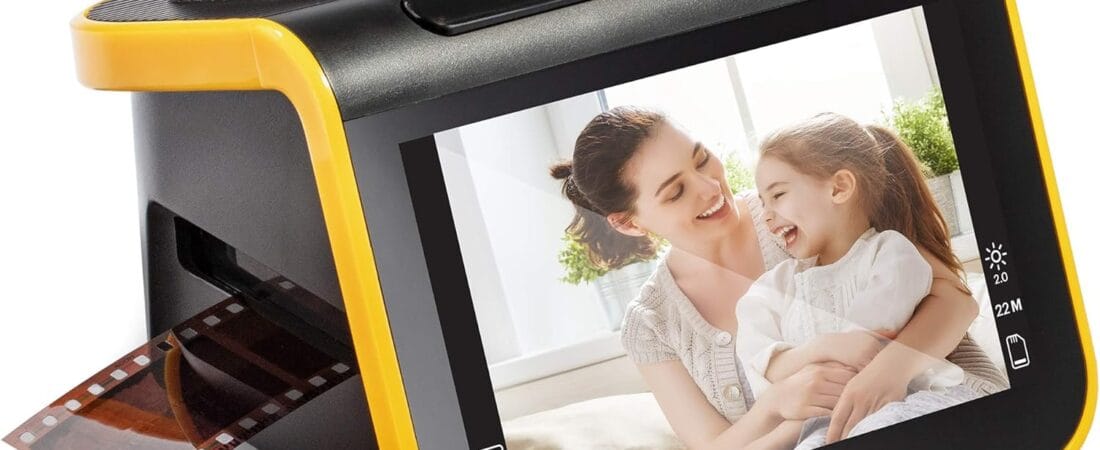
The KODAK Slide N Scan is the film and slide scanner to buy if you have boxes of old negatives or slides you keep meaning to digitize — it’s fast, simple enough to use without reading the manual, and the results genuinely hold up.
Why We Picked the KODAK Slide N Scan
At $189.99, the Slide N Scan converts 35mm, 110, and 126mm negatives and slides into 22MP digital JPEGs via a 5-inch LCD screen, with continuous-feed film trays that speed up scanning large batches. It’s currently the #1 Best Seller in Slide & Negative Scanners on Amazon, holding a 4.4-star average across 12,577 ratings — one of the largest, most trustworthy review samples in this category.
What Owners Actually Say
The single most repeated theme is how little friction there is between unboxing and getting usable scans — several owners describe seeing their first digitized image within minutes of setup, with no real learning curve. One owner who had previously returned a competing scanner over blurry, off-color results said the Kodak scans came out crisp and clear by comparison, and went on to scan over 2,000 slides for a family project. Another owner compared it favorably to a bulkier Wolverine-brand scanner they’d previously owned and rarely used, calling the Kodak plug-and-play by comparison. Multiple reviewers specifically frame it as a way to finally deal with a backlog of decades-old family photos and slides that had been sitting untouched.
One Thing to Check
A handful of more critical reviews flag real limitations worth knowing before you buy. The scanner crops roughly 10% off the top and bottom of each image, which has cut off heads or arms in some portrait-orientation shots. It also doesn’t reset your film-type setting between sessions, so you need to re-select it every time you power the unit on. Owners working with older, curled negatives report the film can lose focus or fail to feed smoothly, sometimes requiring you to manually reposition it. And critically, the unit requires a separately purchased SD or SDHC card (not included, and capped at a modest capacity — check the manual for the exact limit) — there’s no way to scan directly to a connected computer in real time, so you scan to the card first and transfer afterward.
Pros
- Very easy setup and operation — multiple owners had usable scans within minutes, no manual required
- Large 5″ LCD screen for immediate preview and light editing before saving
- 22MP resolution with noticeably better clarity than several owners’ previous scanners
- Continuous-feed trays make scanning large batches (hundreds to thousands of slides) practical
- #1 Best Seller with a large, trustworthy 12,577-rating sample at 4.4 stars
Cons
- Requires a separately purchased SD/SDHC card — not included, and there’s a capacity ceiling
- Crops ~10% off the top and bottom of each scan, which can clip portrait-orientation subjects
- Film-type setting doesn’t persist between power cycles — you re-select it every session
- Older curled negatives can lose focus or need manual repositioning to feed correctly
Film Scanner Requiring an SD Card: What Do You Need to Buy Separately?
The KODAK Slide N Scan doesn’t include an SD or SDHC memory card in the box — you’ll need to supply your own before you can start scanning negatives or slides.
FAQ
- Do I need to buy anything else to use it? Yes — you’ll need your own SD or SDHC memory card, which is not included in the box.
- Can it scan both negatives and slides? Yes, it handles 35mm, 110, and 126mm color and black-and-white negatives as well as 50mm slides, using the included adapters.
- Will it work with very old or damaged film? It can, but results depend heavily on the physical condition of the original — curled or damaged negatives may need manual repositioning to scan cleanly, per multiple owner reports.
- Is it practical for scanning a large batch of slides? Yes — this is specifically what several owners used it for, with one reporting over 2,000 slides scanned for a single family project using the continuous-feed tray system.
- Will it cut off parts of my photos? It crops approximately 10% off the top and bottom edges, so some minor cropping is expected compared to the original frame.
- Does it need to be connected to a computer to scan? No — it saves scans directly to the SD card, so it can operate as a standalone unit without a computer connection.
For Specific Needs
I have thousands of old family slides — is this practical for a big batch job?
Yes — this is specifically what several owners used it for, with one reporting over 2,000 slides scanned for a single family project using the continuous-feed tray system.
Will it cut off parts of my photos?
It crops approximately 10% off the top and bottom of each scan, which owners note can clip heads or arms in portrait-orientation shots — worth knowing before you scan anything where framing matters.
Can I save scans directly to my computer instead of an SD card?
No — you scan to an SD/SDHC card first (not included), then transfer the files to a computer afterward. There’s no real-time direct-to-computer scanning mode.
Methodology
This recommendation is based on rigorous analysis of verified-purchase reviews and live Amazon listing data — cross-checked against the manufacturer’s own specs. We did not physically test this exact unit ourselves.
Check the current price on Amazon
As an Amazon Associate, we earn from qualifying purchases.
How We Built This Guide
Our process: this is a research-based pick, not a hands-on lab test. We aggregate verified-owner reviews, professional test data where available, and real discussion patterns from communities like Reddit, then flag every estimate as such in the guide above. We do not accept sponsored placements.
Last checked: September 24, 2026