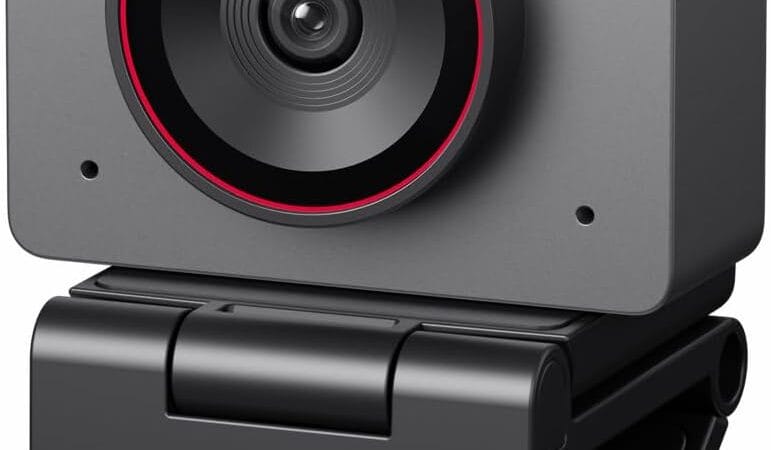
We researched the OBSBOT Meet 2-4K Webcam using live Amazon listing data and verified customer reviews — this is a research-based pick, not a hands-on test of a physical unit in our possession.
Why We Picked the OBSBOT Meet 2-4K Webcam
Most budget webcams top out at 1080p, but the Meet 2 packs a genuine 4K sensor into a body the size of a pair of earbuds (40.5 grams), with a larger 1/2″ CMOS sensor for better low-light performance than typical compact webcams. It’s an Amazon’s Choice pick with a 4.5-star average across 2,199 ratings and over 500 units bought in the past month. AI framing and gesture control (a raised palm toggles auto-framing, a point-and-hold adjusts zoom) mean it can follow you around a home office without extra software running in the background, and the single USB-C connection makes it genuinely plug-and-play.
What Owners Actually Say
The recurring praise across reviews is image quality relative to price — multiple verified buyers called the 4K output “spectacular” and said it made a visible difference on podcast recordings and daily video calls, with one reviewer noting people “constantly comment on how clear and high-quality my video is.” The included magnetic privacy cover and metal build also come up repeatedly as feeling more premium than the roughly $100–129 price point suggests.
One Thing to Check
The most consistent complaint isn’t image quality — it’s the included magnetic desktop stand. Several verified buyers reported it doesn’t grip monitors securely and the camera falls off with normal bumps (“the poor mounting ‘stand’ … does not secure the camera on the monitor properly and falls constantly,” one wrote, eventually buying a separate mount). Amazon’s own AI review summary also flags that the camera can overheat during extended 4K calls (around 90 minutes). If you plan to mount it permanently, budget for a simple 1/4″-thread mount rather than relying on the bundled clip.
Pros
- True 4K resolution with a larger 1/2″ sensor for better low-light video than typical compact webcams
- Tiny, lightweight (40.5g) and fully plug-and-play over a single USB-C cable
- AI auto-framing and gesture control work without needing a companion app running
- Magnetic privacy cover and metal housing feel premium for the price
- Amazon’s Choice with a 4.5-star average across 2,199 ratings
Cons
- Bundled magnetic desktop stand is reported to be insecure on some monitors and can fall off
- Can run warm and reportedly overheats on very long (90+ minute) continuous 4K calls
- Full AI feature set (deep customization) needs the OBSBOT Center companion app, Windows/Mac only
FAQ
Does the OBSBOT Meet 2 work on Mac and Windows?
Yes — it’s plug-and-play over USB-C on both, and the OBSBOT Center app (for deeper customization) is available for Windows and Mac.
Do I need extra lighting for good video quality?
Reviewers report clean, natural-looking video even in moderate indoor lighting thanks to the larger 1/2″ sensor and HDR, though like any webcam it improves further with a dedicated light source.
Is the microphone good enough to skip an external mic?
It has a built-in dual microphone that reviewers describe as fine for meetings and calls, but several who do podcasting or streaming still pair it with a separate external microphone for higher production value.
For Specific Needs
Does it work on Linux? A verified buyer in Italy confirmed it works as a standard plug-and-play UVC camera on Linux over USB, though the OBSBOT Center companion app (needed for the deeper AI framing customization) is Windows/Mac only.
Will it stay mounted on my monitor? Multiple reviewers reported the bundled magnetic stand doesn’t grip securely and the camera can fall off with bumps to the desk or monitor — if permanent mounting matters to you, plan to use the camera’s 1/4″ threaded mount point with a separate arm or tripod instead of the included clip.
Can I use it for long streaming sessions without overheating issues? Amazon’s review-summary data flags overheating after roughly 90 minutes of continuous 4K video calling — for marathon streams, keeping the room cool or dropping to 1080p/60fps may help.
Methodology
This pick is based on live Amazon listing data (price, rating, review count, availability) and analysis of real verified-purchase customer reviews as of August 2026. We did not physically test this exact unit; all claims above trace to the live listing or to direct quotes/themes found in verified reviews.
Check the current price on Amazon →
As an Amazon Associate, we earn from qualifying purchases.
How We Built This Guide
Our process: this is a research-based pick, not a hands-on lab test. We aggregate verified-owner reviews, professional test data where available, and real discussion patterns from communities like Reddit, then flag every estimate as such in the guide above. We do not accept sponsored placements.
Last checked: August 4, 2026