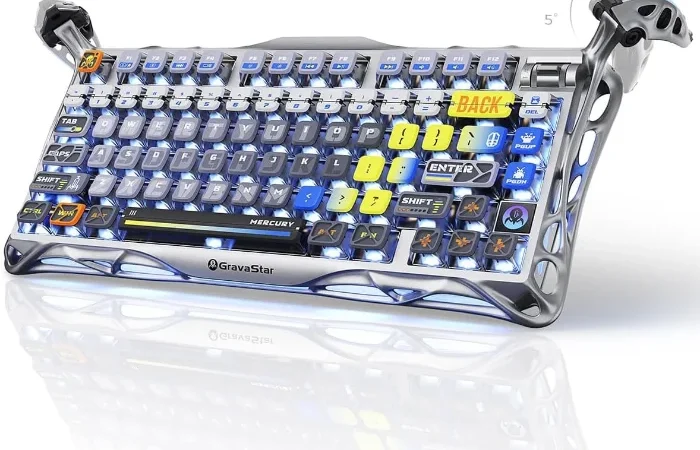
This pick is based on live Amazon listing data and an analysis of verified-purchase reviews — we did not physically test this exact unit ourselves.
Why We Picked the GravaStar Mercury K1 Pro
Most wireless mechanical keyboards in this price range copy the same formula: 75% layout, hot-swappable switches, RGB lighting, tri-mode connectivity. The Mercury K1 Pro follows that formula too, but wraps it in an aluminum alloy “skeletal” frame and a design language borrowed from sci-fi prop work, which stands out at $179.95. It’s backed by a small but heavily lopsided review base — 726 ratings averaging 4.8 stars, 91% of them five-star — unusually strong for a mechanical keyboard brand younger than incumbents like Keychron or Logitech. Under the design, the spec sheet is genuinely competitive: custom Kailh Speedy Mint linear switches rated for 70 million keystrokes, a gasket-mounted FR4 plate with 5 layers of sound-dampening foam, an 8000mAh battery, and wired/Bluetooth/2.4GHz tri-mode connectivity.
What Owners Actually Say
The most repeated theme across five-star reviews is the combination of weight and sound — multiple owners specifically describe how “thocky” the keyboard sounds thanks to the gasket mount and internal foam, and several say the aluminum frame gives it enough heft that it doesn’t slide around on the desk during normal typing or gaming. One reviewer using it in wired mode reported zero lag or input delay; another who swaps between a PS5 and a PC daily said the tri-mode switching made that swap trivial. Several long-term owners have gone on to buy a second GravaStar keyboard or mouse after using the K1 Pro, citing build quality and the RGB customization software as reasons to stay with the brand.
One thing to check
The linear switches are the biggest adjustment for buyers used to something else: because there’s no tactile bump at the actuation point, some reviewers who normally use tactile or clicky switches said it took a few days to adapt. The compact 75% layout is also a real trade-off — the Page Down key sits immediately to the right of Enter and got triggered by accident during one reviewer’s first week, and there are no dedicated Home/End keys, so those functions require a key combination instead. Separately, at least one critical review called the $179.95 price too high for what’s inside; if you’re price-sensitive or specifically want a lower-profile, more tactile-feeling keyboard, this model may not be the fit despite the strong average rating.
Pros
- Aluminum alloy frame with a heavy, stable feel on the desk
- Hot-swappable Kailh Speedy Mint linear switches (70-million keystroke rated)
- Gasket-mounted plate plus 5-layer foam dampening for a distinctive, deep sound
- 8000mAh battery and true tri-mode connectivity (wired / Bluetooth / 2.4GHz)
- Dual independent RGB lighting systems with 16.8 million colors and 13 modes
Cons
- Linear switches lack a tactile bump — an adjustment period if you’re used to tactile or clicky switches
- 75% layout puts Page Down directly beside Enter and drops dedicated Home/End keys
- Keycap legends ship in English only, per at least one international buyer
- A few reviewers found the price steep relative to more established keyboard brands
FAQ
- Is the GravaStar Mercury K1 Pro good for gaming and typing, or just one of the two? Reviews consistently describe it working well for both — the linear switches suit fast, repeated key presses for gaming, and several owners specifically praised the typing feel for daily work use.
- Do the switches and keycaps use a standard hot-swap socket, or a proprietary one? It’s hot-swappable with standard 3-pin and 5-pin mechanical switches, and the box includes a switch/keycap puller plus four replacement switches, so it can be customized with other brands’ switches later.
- How long does the battery actually last in wireless mode? GravaStar doesn’t publish an exact hour figure on the listing, but the 8000mAh cell is unusually large for a keyboard this size, and reviewers using 2.4GHz wireless mode describe the battery lasting for days between charges rather than needing nightly charging.
- Are mechanical keyboards like this loud compared to a laptop or membrane keyboard? Yes, noticeably — the Kailh Speedy Mint switches are linear rather than silent, so expect a clearly audible click-clack, though the 5-layer sound-dampening foam and gasket mount take some of the harshness out of it compared to unmodded budget boards.
- Can mechanical keyboards like this connect to multiple devices? Yes — it runs in tri-mode (2.4GHz wireless, Bluetooth, and wired USB-C), so it can pair with a laptop over Bluetooth and switch to a desktop over the wireless dongle without re-pairing each time.
- How do you remove the keycaps to clean or swap switches? Use the included keycap puller to pull each cap straight up and off, then use the switch puller on the exposed switch — the hot-swap sockets mean no soldering is needed for either step.
For Specific Needs
“I switch between a PC and a PS5 (or other console) constantly — is that actually easy with this keyboard?” Based on a real owner’s review, yes: the K1 Pro’s tri-mode connectivity includes a physical switch between wired, Bluetooth, and 2.4GHz modes, and one reviewer specifically described using it to move between a PS5 and a PC “with the flip of a switch,” without re-pairing each time.
“I want a keyboard I can eventually put different keycaps or switches on — will this one let me?” Yes — it uses a standard hot-swappable socket compatible with common 3-pin and 5-pin mechanical switches rather than a closed proprietary system, and ships with a puller tool and spare switches to get started.
“Does the keyboard only come with a US/English key layout?” Based on a review from a non-US buyer, the retail version currently ships in English layout only — if you need a native ISO or non-English legend layout, that isn’t offered directly on this listing.
Mechanical Keyboard for Typing: Does It Hold Up for Daily Work?
Not every mechanical keyboard marketed for gaming translates well to a full workday of typing, but reviewers of the Mercury K1 Pro repeatedly call out the opposite: the linear Kailh Speedy Mint switches and gasket-mounted plate give a softer, more cushioned keystroke than rigid budget boards, which matters more over eight hours of typing than during a short gaming session. The 75% layout keeps a dedicated arrow cluster and function row while staying compact enough for a standard desk, so switching between spreadsheet work and a match doesn’t mean reaching for a different keyboard.
Methodology
This recommendation is based on the live Amazon listing (price, specs, current rating and review count) and a review of verified-purchase feedback, including critical reviews, at the time of writing. We did not physically test this exact unit; claims about switch feel, sound, and connectivity reflect what multiple independent reviewers reported, not our own hands-on testing.
Check Current Price on Amazon →
As an Amazon Associate, we earn from qualifying purchases.
Related Guides on VERDICT
How It Compares: Independent Lab Tests
Click and Thock, a dedicated mechanical-keyboard sound-testing outlet, rated the Mercury K1’s acoustics as genuinely premium — five layers of sound dampening foam produced no metallic pings or hollow echoes, with the Kailh linear switches sounding “creamy” enough for ASMR-style typing videos. Tom’s Guide confirmed the build quality and 8,000mAh battery as standout features. The honest catch, per Trusted Reviews: the companion software is barebones and Windows-only with no macOS support at all, and the keyboard ships without a wrist rest despite its tall gasket-mount case — a real oversight reviewers flagged given the typing height.
| Spec | GravaStar Mercury K1 Pro | Typical premium gasket-mount keyboard |
|---|---|---|
| Switches | Kailh Speedy Mint linear, 45g | Varies, often hot-swappable |
| Sound profile | Rated excellent, no hollow echo | Varies widely |
| Battery | 8,000mAh, long RGB runtime | Often smaller |
| Software | Windows-only, basic | Often cross-platform |
| Wrist rest included | No | Often included |
Bottom line: independent testing confirms the K1 Pro genuinely delivers on sound and build quality, which is its main selling point. Mac users and anyone who wants software-level customization or a bundled wrist rest should factor those real gaps into the decision.
How We Built This Guide
Our process: this is a research-based pick, not a hands-on lab test. We aggregate verified-owner reviews, professional test data where available, and real discussion patterns from communities like Reddit, then flag every estimate as such in the guide above. We do not accept sponsored placements.
Last checked: September 24, 2026