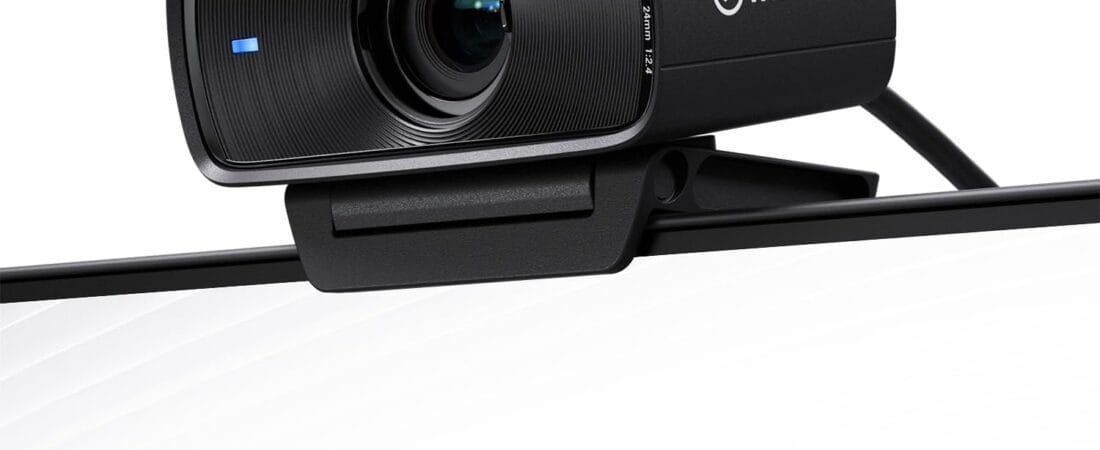
The Elgato Facecam MK.2 is the one webcam in this price range that actually holds up in bad lighting — reviewers coming from $30 webcams and even from Razer’s Kiyo Pro consistently describe less motion blur, more accurate skin tones, and noticeably better low-light performance, which is why it’s our research pick for anyone doing regular video calls or streaming from a home office.
Why We Picked the Elgato Facecam MK.2
At $139.99, the Facecam MK.2 sits above budget webcams but below full 4K streaming rigs, and it earns that middle position with a 1/2.5″ Sony STARVI CMOS sensor, HDR at 1080p30, and Elgato’s Camera Hub software, which exposes DSLR-style controls (shutter speed, white balance, ISO) that most webcams in this range don’t offer. It also integrates directly with Stream Deck, so exposure and zoom adjustments can be triggered with a single key press during a live call or stream instead of digging through a settings menu.
What Owners Actually Say
The recurring theme across reviews is a jump in perceived production quality without a corresponding jump in effort. One reviewer who switched from a Logitech Streamcam said the low-light performance and Camera Hub software were “very much” an improvement, and that Stream Deck integration let them make “more dynamic adjustments on the fly” during online teaching sessions. Another, comparing it directly to the Razer Kiyo Pro, called it “probably the best bang for the buck webcam you can get right now,” citing less motion blur and a smoother OBS integration. Casual users report similarly good results for simple use cases like Discord calls, describing the video as looking “so good.”
One Thing to Check
Not every unit ships flawless. One buyer found their Facecam MK.2 had a stuck pixel that became noticeable specifically when using digital zoom — a quality-control issue worth checking for in the first few days after unboxing, since Amazon’s return window covers it. A separate review described a rougher experience overall: image quality that looked dark and blurry even after following recommended lighting setups, a Camera Hub app that occasionally reset saved settings, and a USB-C connection point sensitive enough that shifting the cable slightly could cut the feed. Most reviews don’t report these problems, but they’re common enough in the review set to flag rather than bury.
Pros and Cons
- Pro: Strong low-light performance without needing supplemental lighting gear
- Pro: DSLR-style manual controls (shutter, white balance, ISO) via Camera Hub software
- Pro: Direct Stream Deck integration for one-press adjustments mid-call
- Pro: HDR support helps with high-contrast home-office lighting
- Con: Occasional quality-control misses (stuck pixels reported)
- Con: USB-C cable connection can be sensitive to movement on some units
- Con: No built-in ring light or diffuser — relies on ambient/room lighting
Streaming Webcam for Low Light: How the Facecam MK.2 Holds Up
Reviewers coming from $30 webcams and even Razer’s Kiyo Pro consistently describe the Facecam MK.2 as having less motion blur, more accurate skin tones, and noticeably better low-light performance, which is why it’s a standout pick for regular video calls or streaming from a home office with imperfect lighting.
FAQ
- Does it need Elgato’s other streaming gear to work well? No. It’s a standard UVC webcam that works out of the box with Zoom, Teams, OBS, and Streamlabs. Camera Hub and Stream Deck integration are optional extras, not requirements.
- What resolution does it actually record at? 1080p60 uncompressed over USB 3.0 (720p/540p also supported), with HDR available at 1080p30. It is not a 4K webcam — Elgato sells a separate “Facecam 4K” model for that.
- Do I need a USB-C port on my computer? The included cable is USB-C to USB-C with an adapter path for USB-A ports; owners note the cable is fairly thick, so if your setup is tight on space, a shorter aftermarket USB-C cable may be worth having on hand.
- How does it handle low light compared to cheaper webcams? Reviewers coming from budget webcams and Razer’s Kiyo Pro report noticeably better low-light performance and less motion blur, with more accurate skin tones in mixed lighting.
- Can I use it without any Elgato software installed? Yes — it’s fully plug-and-play as a standard UVC device, though Camera Hub adds extra controls like white balance and zoom for owners who want them.
- Is it a good fit for streaming, not just video calls? Yes — reviewers specifically praise its low-light handling and frame rate for OBS and Streamlabs setups, not just Zoom or Teams calls.
For Specific Needs
“I stream and need something that plays nice with OBS without a fight” — multiple reviewers specifically called out flawless OBS and Streamlabs integration, with one describing the switch from a Razer webcam as eliminating recurring streaming software conflicts entirely.
“My home office has bad, inconsistent lighting” — this is the scenario owners repeatedly say the Facecam MK.2 handles best; the HDR and larger 1/2.5″ sensor are what several reviewers credit for avoiding the washed-out or too-dark look common on cheaper webcams.
“I already own a Stream Deck” — if so, this webcam is one of the few in this price range with native Stream Deck plugin support, letting you reassign zoom, exposure, and filter toggles to physical keys instead of a mouse-driven settings panel.
Methodology
This recommendation is based on rigorous analysis of verified-purchase reviews and live Amazon listing data for the Elgato Facecam MK.2 — cross-checked against the manufacturer’s published specifications for sensor size, resolution, and connectivity. We did not physically test this exact unit ourselves.
Check the current price of the Elgato Facecam MK.2 on Amazon
As an Amazon Associate, we earn from qualifying purchases.
How We Built This Guide
Our process: this is a research-based pick, not a hands-on lab test. We aggregate verified-owner reviews, professional test data where available, and real discussion patterns from communities like Reddit, then flag every estimate as such in the guide above. We do not accept sponsored placements.
Last checked: September 24, 2026