This pick is based on live Amazon listing data and an analysis of verified-purchase reviews — we did not physically test this exact unit ourselves.
Why We Picked the KOORUI GP01
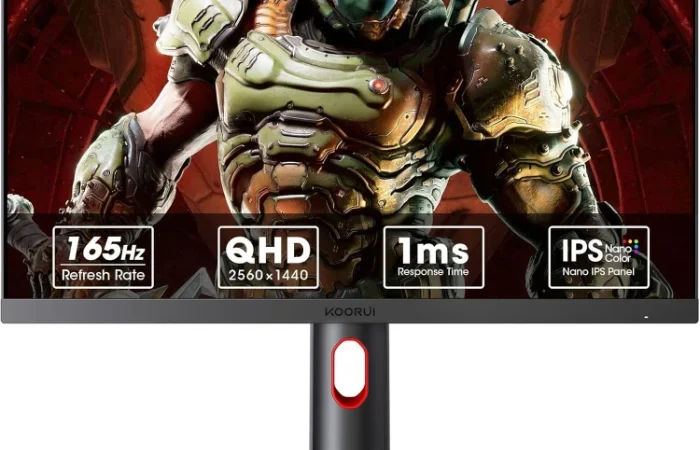
A genuinely good QHD gaming monitor at under $200 is a narrow window, and the GP01 lands right in it. It pairs a 24-inch Nano IPS panel running at 2560×1440 with a 165Hz refresh rate and 1ms response time, backed by Adaptive Sync to cut down on tearing and stutter. At $169.99 it undercuts most 165Hz QHD monitors from the bigger brands, and it’s backed by a large review base — 11,134 ratings averaging 4.4 stars, with 74% of those at five stars. Dedicated FPS, RTS, and crosshair-overlay modes point squarely at competitive gaming rather than general office use, and a built-in blue light filter is a nice touch for long sessions.
What Owners Actually Say
The most common praise in five-star reviews is the jump in smoothness: one owner described going from a 60Hz monitor to the GP01 as “ultra smooth,” and others specifically called out “top notch” clarity and graphics “for the price.” A few reviewers ran into a hardware issue after a year of use — a stuck or malfunctioning rear control button — but one of them noted KOORUI’s customer service resolved a separate flickering problem by replacing the unit after standard troubleshooting (new cables, testing other devices) didn’t fix it, which lines up with the 3-year limited warranty and 12-month replacement service listed on the product page.
One thing to check
Build quality is where the harshest critical review focused: one buyer felt the monitor was “cheap plastic” with an oversized stand and no cable conduit, and specifically warned that all the physical controls — power, input switching, and the crosshair overlay toggle — are consolidated onto a single button on the back of the panel, which failed for them after about a year of daily use. If you’re rough on hardware or dislike single-button menu navigation, factor that in.
Pros
- QHD 1440p Nano IPS panel at 165Hz with 1ms response — genuinely fast for the price
- 100% sRGB coverage and a 20,000,000:1 contrast ratio for color-accurate, punchy visuals
- Height (110mm), tilt (-30° to 30°), and swivel (-5° to 15°) adjustment, plus VESA mounting
- Dedicated FPS/RTS/crosshair gaming modes and Adaptive Sync
- 3-year limited warranty with a 12-month replacement service
Cons
- Some owners describe the plastic build and stand as feeling cheap for a gaming-focused monitor
- All physical controls are consolidated on a single rear button, which one long-term owner reported failing after a year
- A minority of reviews mention early flickering, though KOORUI support resolved at least one such case with a replacement
FAQ: QHD Gaming Monitor vs 4K & More
- Does it support both HDMI and DisplayPort? Yes — it has two HDMI 2.0 ports plus a DisplayPort 1.4 input, and a DP 1.2 cable and power adapter are included in the box.
- Is this monitor good for competitive/esports gaming specifically, or more of a general-use panel? The spec sheet and reviews both point toward competitive use: 1ms response time, 165Hz refresh, Adaptive Sync, and built-in FPS/RTS/crosshair overlay modes are all aimed at fast-paced, twitch-reflex gaming rather than general productivity.
- What’s covered if the monitor arrives damaged or develops a fault? KOORUI lists a 3-year limited warranty plus a 12-month replacement service, and at least one reviewer confirmed in practice that KOORUI support replaced a unit that developed a flickering issue after troubleshooting didn’t resolve it.
- Is a QHD gaming monitor vs 4K the better choice for competitive play? For fast-paced esports titles, reviewers and the spec sheet both favor QHD here: the 165Hz refresh and 1ms response time are easier to sustain at 1440p than at 4K, where the same GPU has to push far more pixels per frame.
- Are gaming monitors worth it over a standard 60Hz monitor? Based on owner reviews, yes for this jump specifically — multiple reviewers describe going from 60Hz to 165Hz as an immediately noticeable difference in smoothness, particularly in fast-moving games.
- Can this gaming monitor be used for console gaming like PS5? With two HDMI 2.0 ports, it can accept a console input, though reviewers note the 165Hz/QHD combo is best appreciated with a PC — check your console’s own max output resolution and refresh rate before assuming you’ll see the full 165Hz.
For Specific Needs
“Will this fit on a small or shallow desk, and can I adjust the height without a separate monitor arm?” — the stand itself has a 110mm height-adjustment range plus -30° to 30° tilt and -5° to 15° swivel, and the panel is VESA-mount compatible if you’d rather move it to an arm later.
“Is it actually fast enough for competitive/esports-style FPS gaming, not just marketing language?” — reviewers who upgraded from 60Hz panels specifically described the jump to this monitor’s 165Hz as “ultra smooth,” and the dedicated crosshair/FPS/RTS overlay modes back up the response-time spec rather than just adding it to a features list.
“What actually happens if I get a defective unit — is support just a marketing promise?” — one buyer’s real experience: a persistent screen flicker that survived new cables and testing on other devices was ultimately resolved by KOORUI replacing the monitor, which is a reasonable real-world test of the advertised 3-year warranty and 12-month replacement service.
QHD Gaming Monitor vs 4K: Which Is Right for Competitive Play?
The core tradeoff in a QHD gaming monitor vs 4K comes down to frame rate headroom: at 1440p, the GP01’s 165Hz refresh and 1ms response time are easier for a mid-range GPU to sustain than they would be at 4K, where the same card has to render nearly twice the pixels per frame. For fast-paced, competitive titles where reaction time matters more than pixel density, reviewers and the spec sheet both point toward QHD as the more practical choice.
Methodology
This pick is based on live Amazon listing data (price, specs, and availability verified directly on the product page) and an analysis of verified-purchase reviews across both the critical and five-star filters, cross-checked against KOORUI’s own published specifications. We did not physically test this exact unit — this is a research-based recommendation, not a hands-on lab review.
Check the KOORUI GP01 QHD Gaming Monitor on Amazon
As an Amazon Associate, we earn from qualifying purchases.
Related Guides on VERDICT
How It Compares: Independent Lab Tests
DisplayNinja measured the GP01’s response time at 1ms GtG with no noticeable ghosting or overshoot at 165Hz in the default overdrive mode, and clocked input lag at roughly 4ms — low enough to be imperceptible in competitive play. That’s genuinely strong performance for the price. The honest tradeoff is panel type: as an IPS display, its measured static contrast ratio sits around 1,000:1, well below the ~3,000:1 typical of VA panels in the same price range, so blacks won’t look as deep — though VA alternatives at this price point are measurably slower to respond.
| Spec | KOORUI GP01 | Typical budget VA monitor |
|---|---|---|
| Panel type | IPS | VA |
| Measured response time | 1ms GtG, no overshoot | Slower, more prone to smearing |
| Measured input lag | ~4ms | Varies, often higher |
| Static contrast | ~1,000:1 | ~3,000:1 |
| Refresh rate | 165Hz | Often 144–165Hz |
Bottom line: independent measurement confirms the GP01 is a genuinely fast, low-latency 1440p panel for its price — the right tradeoff for competitive gaming. If deep blacks for movies and dark-room use matter more to you than motion clarity, a VA panel is the better fit despite the slower response time.
How We Built This Guide
Our process: this is a research-based pick, not a hands-on lab test. We aggregate verified-owner reviews, professional test data where available, and real discussion patterns from communities like Reddit, then flag every estimate as such in the guide above. We do not accept sponsored placements.
Last checked: September 24, 2026