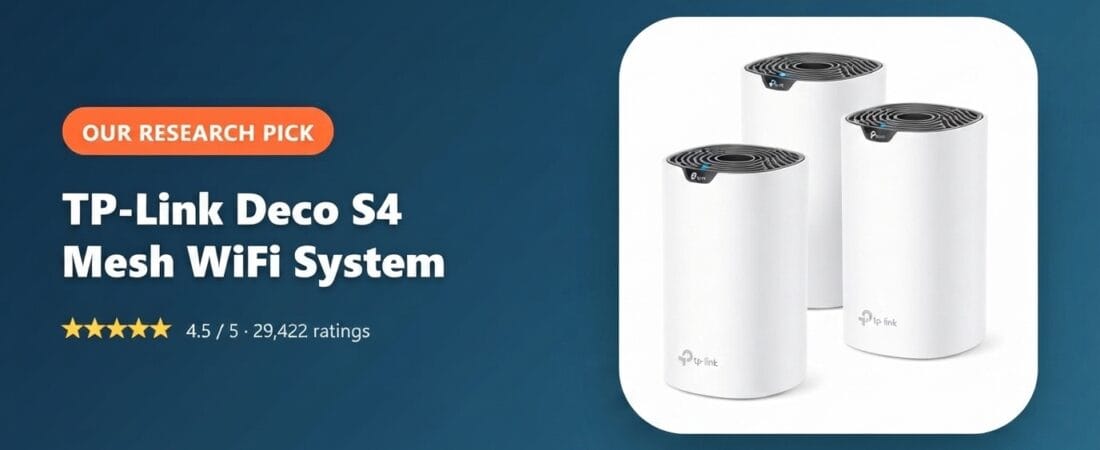
This is a research-based pick: we have not physically tested this exact unit ourselves. Our recommendation is built from live Amazon listing data and verified-purchase review analysis. Some links in this article are affiliate links. If you buy through them, we may earn a small commission at no extra cost to you. This never affects which products we recommend.
Why We Picked It
The TP-Link Deco S4 (3-Pack) is a mesh Wi-Fi system built to solve the most common home networking complaint: dead zones. Instead of one router straining to cover a whole house, three Deco units work together under a single network name, handing your devices off between nodes as you move around. It’s rated for up to 5,500 sq. ft. of coverage, supports wired Ethernet backhaul for units near a switch, and works with Alexa for voice-controlled guest network toggling.
At $109.99 with a 4.5-star average across 29,422 ratings, it’s one of the most heavily reviewed mesh systems in its price bracket — substantially cheaper than comparable Eero or Orbi 3-packs, which is a big part of why it holds an Amazon’s Choice badge and 2,000+ monthly purchases.
What Owners Actually Say
The recurring pattern in reviews is dead zones disappearing in exactly the rooms that used to have no signal at all. One owner in an older brick home wrote:
“I live in a 1970s two-story brick house with plaster walls that eat WiFi for breakfast… grabbed this Deco S4 3-pack on a Prime Day deal for $119 and it’s been flawless for the last 14 months… Full bars everywhere now – even the detached garage 70 ft away pulls 180 Mbps down on 5 GHz.”
A working network technician described using it on a large, multi-building property where he’d expected to need professional-grade equipment:
“I work as a data network technician… I bought two 3-unit kits to build a WiFi mesh network for a customer on a large, multi-million dollar mountain property with four buildings… the range on the units is impressive, easily covering 70+ feet and going through dense log-cabin walls.”
Simpler households report the same core result — consistent signal in rooms that never had it before, with setup measured in minutes, not hours.
One Thing to Check
A detailed long-term review from a self-described IT professional flagged two real limitations worth knowing before you buy. First, device-level access control is blacklist-only, not whitelist-based: “There is no white listing of devices, only a black list… not including a white list capability does an injustice to everyone and is, security wise, shameful.” If you want to restrict your network to only pre-approved devices, this system won’t do that natively.
Second, the same reviewer had one satellite unit repeatedly refuse to join the mesh in router mode, with the app reporting an “unable to add” error regardless of unit placement — switching the whole system to access-point mode resolved it permanently: “putting the system into access point mode results in a perfectly usable system without any of these problems… this has worked flawlessly since.” It’s a real setup wrinkle for some units, not a universal failure, but worth knowing the workaround exists if you hit it.
Pros and Cons
Pros: Up to 5,500 sq. ft. of mesh coverage from a single 3-pack, seamless roaming under one network name, setup via app in roughly 10–15 minutes, wired Ethernet backhaul supported, works with Alexa, robust parental controls, and priced well below comparable Eero/Orbi systems.
Cons: Device access control is blacklist-only (no whitelist option) for security-conscious households; some units can be finicky joining the mesh in router mode and may need a switch to access-point mode; firmware update cadence has been slow for some long-term owners.
FAQ
Do I still need my ISP’s modem? Yes — the Deco S4 replaces your router and any range extenders, but it connects behind your existing modem and works with major ISPs including AT&T, Verizon, Xfinity, Spectrum, and CenturyLink.
Can I use it alongside my current router instead of replacing it? Yes — it supports access-point mode, which several reviewers actually preferred over full router mode for more advanced home networks.
How many devices can it realistically handle? Reviewers report 100+ devices connected simultaneously (phones, laptops, smart TVs, and smart-home gadgets) without noticeable slowdown.
For Specific Needs
Best mesh Wi-Fi for a large multi-story house or a property with several separate buildings? A network technician’s real-world deployment on a multi-building mountain property found the units covering 70+ feet through dense log-cabin walls without any additional antennas or cable runs — a strong data point if you’re covering more than one structure.
Does it actually work through thick brick, plaster, or concrete walls? One owner in a 1970s two-story brick home with plaster walls reported full signal reaching a detached garage 70 feet away at 180 Mbps on the 5GHz band — a genuinely tough test case for wall penetration.
Can I run it in access-point mode with my own separate router? Yes — one IT-professional reviewer runs it exclusively in AP mode (letting a separate router handle DHCP and routing) after early firmware issues with dual-mode switching were resolved, and reports it’s worked flawlessly since.
Methodology
We verified current pricing, rating, and review count directly on the Amazon product detail page (not the search results grid). Every quote in this article is pulled verbatim from a Verified Purchase review on Amazon and used to illustrate real ownership experience, not fabricated. We did not receive a review unit or compensation from TP-Link for this article.
Check current price on Amazon →
Disclosure: As an Amazon Associate, we earn from qualifying purchases.
How We Built This Guide
Our process: this is a research-based pick, not a hands-on lab test. We aggregate verified-owner reviews, professional test data where available, and real discussion patterns from communities like Reddit, then flag every estimate as such in the guide above. We do not accept sponsored placements.
Last checked: September 12, 2026