Some links in this article are affiliate links. If you buy through them, we may earn a small commission at no extra cost to you. This never affects which products we recommend.
Why We Picked It
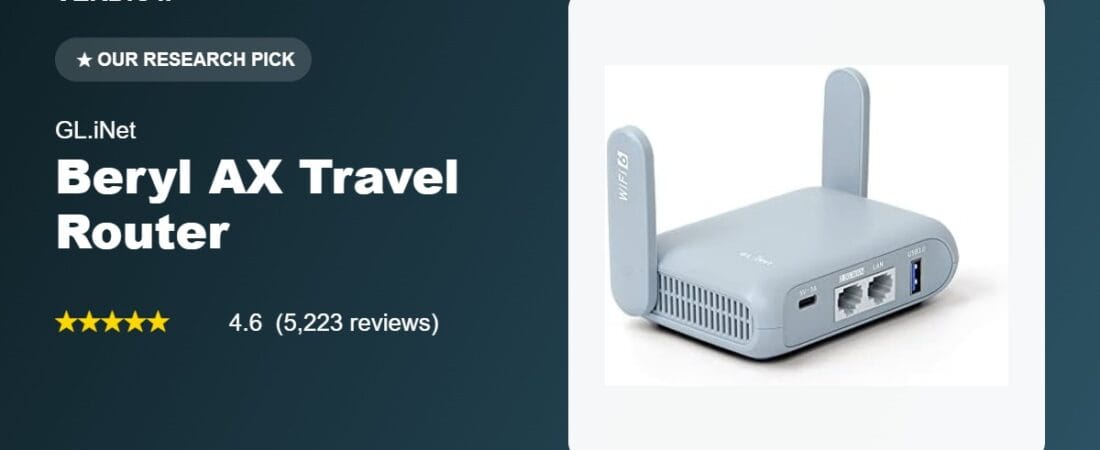
The GL.iNet GL-MT3000 (Beryl AX) is a pocket-sized Wi-Fi 6 travel router that solves a real problem: hotel and cruise-ship Wi-Fi is often slow, unsecured, and limited to one device per login. The Beryl AX lets you connect once and share a single, encrypted connection across every device you’re carrying. It runs dual-band Wi-Fi 6 (574Mbps on 2.4GHz, 2402Mbps on 5GHz), has a 2.5G WAN port for wired connections, and ships with OpenVPN and WireGuard pre-installed so you can tunnel back to your home network or a commercial VPN provider without installing anything on your laptop or phone.
At $98.99 with a 4.6-star average across 5,223 ratings, it holds up as one of the more consistently well-reviewed travel routers in its category. It’s built on OpenWrt firmware, which means it’s genuinely upgradeable over time rather than a sealed black box — a detail that matters if you plan to keep using it for years rather than one trip.
What Owners Actually Say
The recurring theme in reviews is that people buy this for one reason (usually VPN security on the road) and then keep using it for far more. One reviewer who uses it as a full-time travel router wrote:
“This thing travels everywhere with me. My primary use case is setting up a secure WireGuard/OpenVPN tunnel back to my home network while on the go. It handles the encryption flawlessly… After 12+ months of heavy, continuous use, it hasn’t skipped a beat.”
Cruise passengers in particular seem to get outsized value from it, since ship Wi-Fi is notoriously slow and charges per device:
“I boarded Royal Caribbean’s Oasis that uses Starlink… This little modem was amazing. Not only did it connect easily to the ship, the download signal was the same as if my electronic device was connected directly… I hooked up 4 devices at once and didn’t notice much of a lag.”
Another owner uses it as an emergency backup for their home network, not just for travel:
“Our Internet provider lost WiFi to the entire area today. I tethered my phone to the Beryl and had Internet to everything in the house in a minute. Absolutely brilliant piece of kit.”
One Thing to Check
Two setup quirks show up repeatedly enough to be worth knowing before you buy. First, the router defaults to favoring the 2.4GHz band over 5GHz even when signal is strong on both — one long-term owner noted: “the GL.iNet GL-MT3000 seemed to favor 2.4 GHz over 5 GHz. I clicked on the connection type and was able to force 5 GHz in the WAN settings.” It’s a quick fix in the admin panel, but it’s not automatic out of the box.
Second, if you have a strong preference for a specific encrypted DNS provider, check the list first: “it doesn’t let you select a custom https or TLS DNS server with the VPN, you must use one of their pre-approved ones,” per one reviewer who wanted Quad9 but was limited to Cloudflare. Neither issue is a dealbreaker, but both are configuration steps, not plug-and-play defaults.
Pros and Cons
Pros: Genuine Wi-Fi 6 speeds on both bands, 2.5G WAN port for future-proofing, OpenVPN and WireGuard pre-installed with 30+ supported VPN providers, physical toggle switch for instant VPN/AdGuard on-off, OpenWrt firmware with 5,000+ available packages, compact enough to disappear into a laptop bag, works reliably as a home backup router during outages.
Cons: Defaults to 2.4GHz priority and needs a manual tweak to favor 5GHz; DNS-over-HTTPS/TLS limited to a pre-approved provider list rather than any custom server; advanced OpenWrt features can be intimidating if you just want plug-and-play.
FAQ
Does it work with commercial VPN services like NordVPN or ExpressVPN? Yes — reviewers specifically mention configuring it with NordVPN, ExpressVPN, and Proton VPN via WireGuard, in addition to self-hosted VPN servers.
Is it hard to set up for a non-technical user? Most reviewers describe setup as straightforward, especially with a firmware update done before the first trip. The admin panel handles VPN, guest networks, and DNS settings through a no-code interface; the full OpenWrt shell underneath is optional and can be left alone.
Can it really support a whole family’s worth of devices? Yes — one reviewer reported running 8 devices simultaneously over a single VPN tunnel without noticeable slowdown.
For Specific Needs
Best travel router for cruise ship Wi-Fi? Based on direct owner testing on Royal Caribbean’s Oasis-class ship (which uses Starlink), the Beryl AX maintained the same download speed as a direct device connection and handled 4 simultaneous devices with minimal lag — a notable result given how bandwidth-constrained cruise Wi-Fi typically is.
Best router for tunneling into a home VPN while working remotely? One reviewer specifically needed this because their work laptop didn’t allow VPN software installation; they configured a physical switch to auto-connect to their home VPN and reported “no measurable addition in latency” when using a wired LAN connection instead of Wi-Fi to the router.
Can it double as an emergency home internet backup? Yes, per direct owner experience during a residential ISP outage — tethering a phone’s cellular data to the router restored internet to an entire house within a minute.
Methodology
We verified current pricing, rating, and review count directly on the Amazon product detail page (not the search grid). Every quote in this article is pulled verbatim from a Verified Purchase review on Amazon and is used to illustrate real ownership experience, not fabricated. We did not receive a review unit or compensation from GL.iNet for this article.
Check current price on Amazon →
Affiliate link. We may earn from qualifying purchases.
Disclosure: VERDICT is reader-supported. When you buy through links on our site, we may earn an affiliate commission, which helps fund our independent testing and research process.
How We Built This Guide
Our process: this is a research-based pick, not a hands-on lab test. We aggregate verified-owner reviews, professional test data where available, and real discussion patterns from communities like Reddit, then flag every estimate as such in the guide above. We do not accept sponsored placements.
Last checked: September 12, 2026