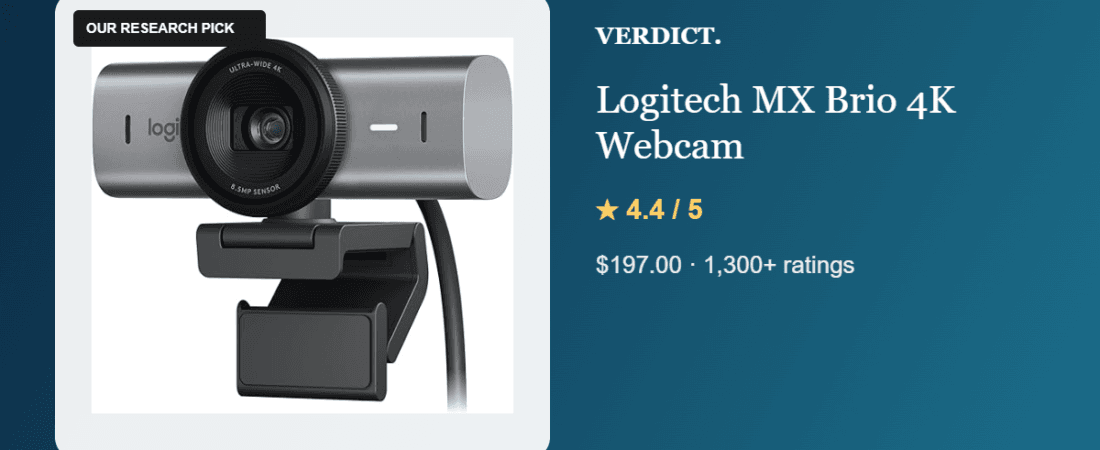
Best 4K Webcam 2026: Our Research Pick — Logitech MX Brio
This pick is based on research into live Amazon listing data and verified-purchase reviews — not a hands-on unit test.
Why We Picked the Logitech MX Brio
The MX Brio is Logitech’s current flagship webcam, shooting true 4K (with a 1080p 60 FPS mode for smoother video calls) and including Logitech’s “Show Mode” for presenting physical objects on camera. It works across Teams, Zoom, Google Meet, and even Nintendo Switch 2, and at $197 it sits at the premium end of the webcam market — a category where most options top out around $100. For remote workers and streamers who’ve been putting off a camera upgrade, it’s one of the few webcams built specifically to replace a bulkier mirrorless-camera-as-webcam setup.
What Owners Actually Say
The strongest praise comes from full-time remote workers who compared it directly to higher-end alternatives: one reviewer who’d been using a mirrorless camera (Panasonic Lumix GH3 with a prime lens) as their desk webcam switched to the MX Brio and called it the best “professional work” webcam they’d personally used, especially for virtual backgrounds. Another described it as “a startling reminder of just how far imaging technology has come,” pointing to the end of “grainy, good enough” video calls. Several owners also highlight RightSight, Logitech’s AI auto-framing feature, as genuinely useful for staying centered during calls without manual adjustment.
One Thing to Check
Not every review was glowing. One owner directly compared the MX Brio to the older Logitech Brio 4K they’d used since 2021 and found the newer camera’s video “more grainy, darker,” with more prominent shadows — the opposite of what an upgrade should deliver, in their experience, even after adjusting settings through Logitech’s Logitune software. A separate owner flagged that the MX Brio doesn’t support Windows Hello face login because it lacks a depth sensor, which was a surprise since a lower-tier Logitech camera they’d previously owned did support it. If face-login or best-in-class low-light performance is a priority, it’s worth checking current listing photos and Q&A before buying.
Pros
- True 4K capture with a 1080p 60 FPS option for smoother calls
- AI-based auto-framing (RightSight) keeps you centered without manual adjustment
- Works with Teams, Zoom, Google Meet, and Nintendo Switch 2
- “Show Mode” for presenting physical items on camera
- Praised by remote workers as an upgrade over prior camera/webcam setups
Cons
- Some owners report grainier, darker video in low light versus the older Logitech Brio
- No Windows Hello support (no depth sensor)
- Premium price for the webcam category
FAQ
Does the MX Brio work with Mac as well as Windows?
Yes — it’s listed as compatible with major video-call platforms (Teams, Zoom, Google Meet) regardless of OS, though Logitune, Logitech’s companion app for camera tuning, is Windows/Mac only.
Can it replace a DSLR/mirrorless camera as a webcam?
Based on at least one direct comparison from an owner who switched from a mirrorless setup, yes — with the caveat that low-light performance reviews are mixed.
Does it support Windows Hello facial login?
No — per owner reports, it lacks the depth sensor required for Windows Hello, unlike some other Logitech models.
Methodology
This recommendation is based on live Amazon listing data (price, rating, review volume) and a review of verified-purchase critical and five-star reviews on the product’s Amazon listing. The exact unit was not physically tested by our team.
Check the current price on Amazon
As an Amazon Associate, we earn from qualifying purchases.
How It Compares: Independent Lab Tests
Professional reviewers don’t fully agree on the MX Brio’s biggest selling point — its low-light performance — and we think that disagreement is worth reporting honestly rather than glossing over. Laptop Mag and Gizmodo both called out the MX Brio’s low-light handling as a standout strength, crediting its 8.5MP Sony STARVIS sensor and larger pixel size for noticeably cleaner video in dim rooms. Tom’s Guide, testing the same camera, was more measured and rated its low-light output as merely average for the 4K webcam category — a useful reminder that “best in class” claims often come down to which room the reviewer happened to test in.
| Spec | Logitech MX Brio | Anker PowerConf C300 |
|---|---|---|
| Sensor | 8.5MP Sony STARVIS | 2MP CMOS |
| Max resolution | 4K at 30fps / 1080p at 60fps | 1080p at 30/60fps |
| Field of view | 90° (fixed) | 78°–115° adjustable |
| Low-light performance | Strong per Laptop Mag/Gizmodo; “average” per Tom’s Guide | Not benchmarked for low light |
| Price | $199.99 | $99 |
Bottom line: the MX Brio’s larger sensor gives it a real resolution and detail advantage over 1080p competitors like the PowerConf C300, and most reviewers do rate its low-light handling above average — but treat “best low-light 4K webcam” as a strong recommendation, not a lab-verified superlative, since not every outlet’s test agreed.
How We Built This Guide
Our process: this is a research-based pick, not a hands-on lab test. We aggregate verified-owner reviews, professional test data where available, and real discussion patterns from communities like Reddit, then flag every estimate as such in the guide above. We do not accept sponsored placements.
Last checked: September 12, 2026